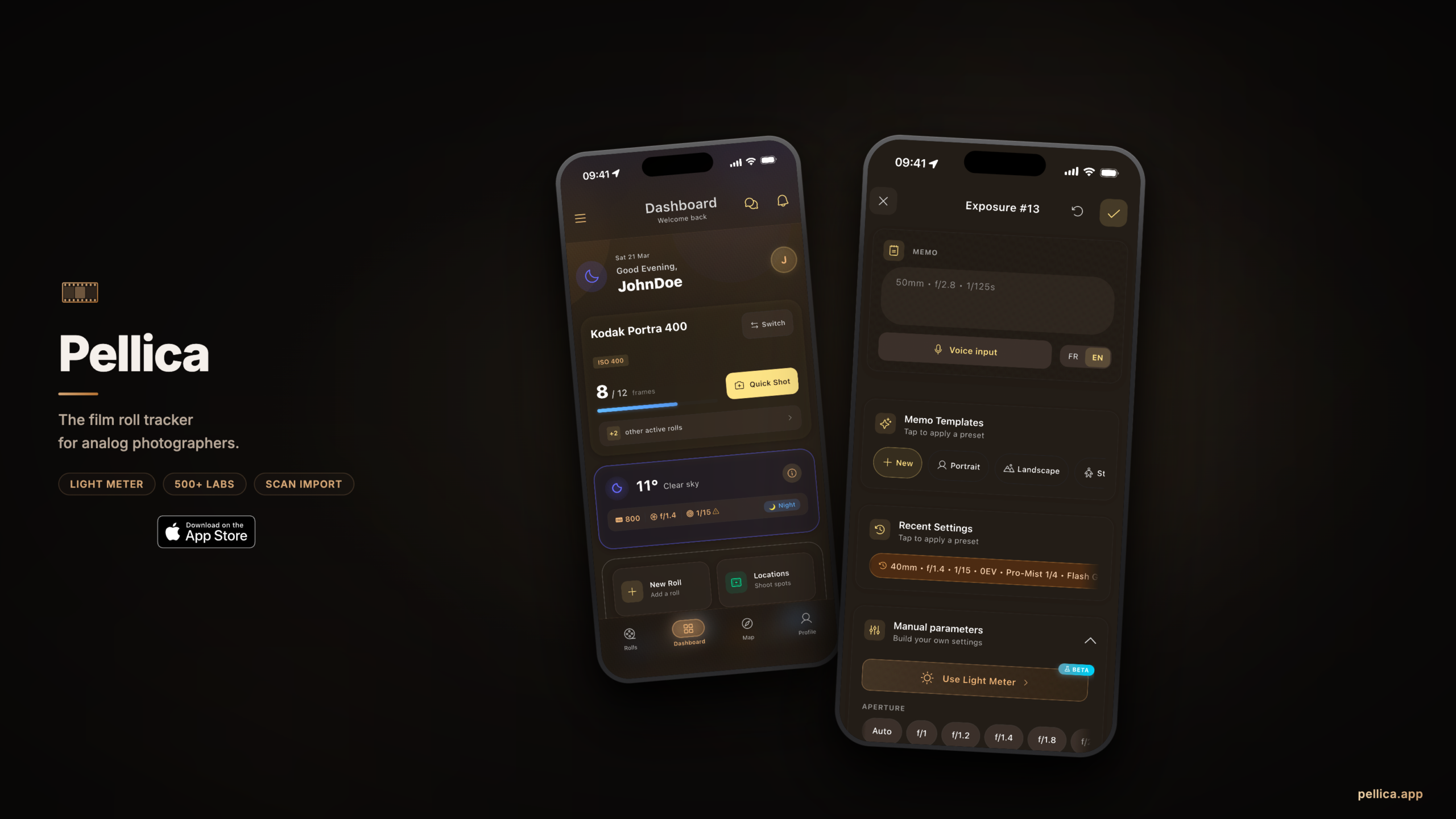
Pellica film roll tracker app for analog photographers

Pellica – Why I Built an App to Track My Film Rolls

By Imad Djebarni

Last November I sent three rolls to my lab and more or less forgot about them. When the envelope came back three weeks later I spread the negatives on my desk and tried to work out what I’d shot. Frame 14 was a cafe window on the Rue de Bretagne — soft light, a woman reading, the kind of frame I’d been chasing for months. I had no idea what settings I’d used. I’d pushed the roll, I was sure of that, but by a stop or two I genuinely couldn’t tell you. My notebook was at the bottom of a bag somewhere and when I eventually dug it out, half the entries were smudged and most of the rest turned out to be from a different roll I’d shot in October.

I looked at that cafe frame for a long time. I couldn’t remember how I’d made it, which meant I couldn’t make it again, which meant I hadn’t really learned anything from it. That was the thing that got me building Pellica.
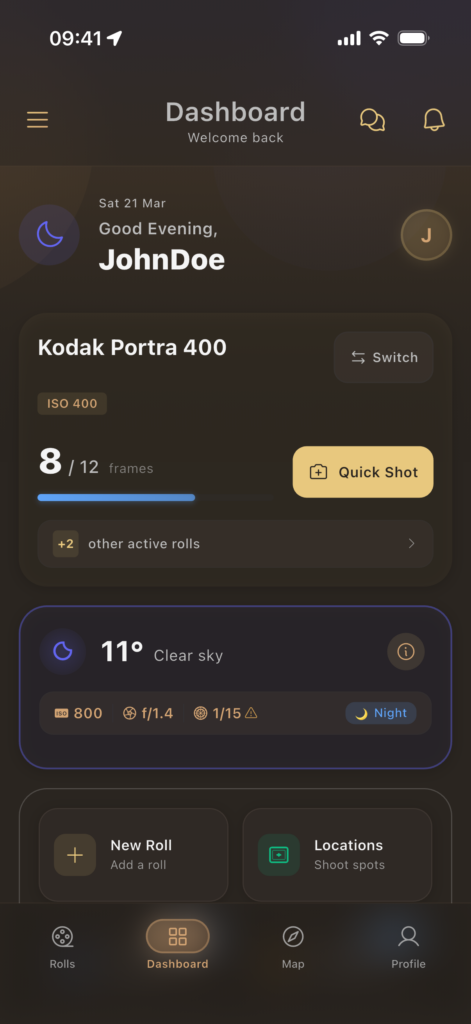
Pellica dashboard showing a list of film rolls with exposure counts and stock names

Why nothing I’d tried had worked

I’m a software developer and I shoot film. Mostly 35mm. Tri-X when I want grain with some weight to it, Portra 400 when the light is doing something unusual, and expired stock from the Saint-Ouen flea market when I’m feeling relaxed about the outcome. I’ve been at this for around four years, which is long enough to have opinions and short enough to still get things wrong on a regular basis.

Like most film shooters I know, I’d tried a lot of ways to keep track of exposures. A pocket notebook I once got caught out with in a Belleville downpour. A Google Sheet I’d open with good intentions and then never fill in. Two or three apps that each did one slice of what I needed but that couldn’t talk to each other. And an awful lot of entries in my iPhone notes that read something like “f/8, maybe 1/250, cloudy??” — which isn’t really data, it’s guessing with extra steps.

The real issue wasn’t that I was lazy. It was that none of these tools fit the rhythm of shooting. You see the light change, you meter, you press the shutter, and the scene has already started to move on. Nobody is going to pull up a spreadsheet in that moment. I wanted something that understood that a logging app has about five seconds of your attention before it becomes a nuisance.

A weekend project that wouldn’t stop

I started on a Sunday in April 2025 with something very simple — tap in aperture, shutter, ISO, move on. That was the whole thing. I used it for a week, then added GPS because I kept forgetting where I’d been standing. Then weather, because my shadows in January and my shadows in June were telling very different stories and I wanted to see why. Then scan import, so I could line up each exposure with the image it produced and finally close the gap between what I’d done and what I’d got back.

Every roll I shot added something to the app. I don’t think I ever sat down and wrote a roadmap. It grew more like a garden does when you keep pulling out whatever bothers you and planting something better in its place.

What a shooting day looks like now

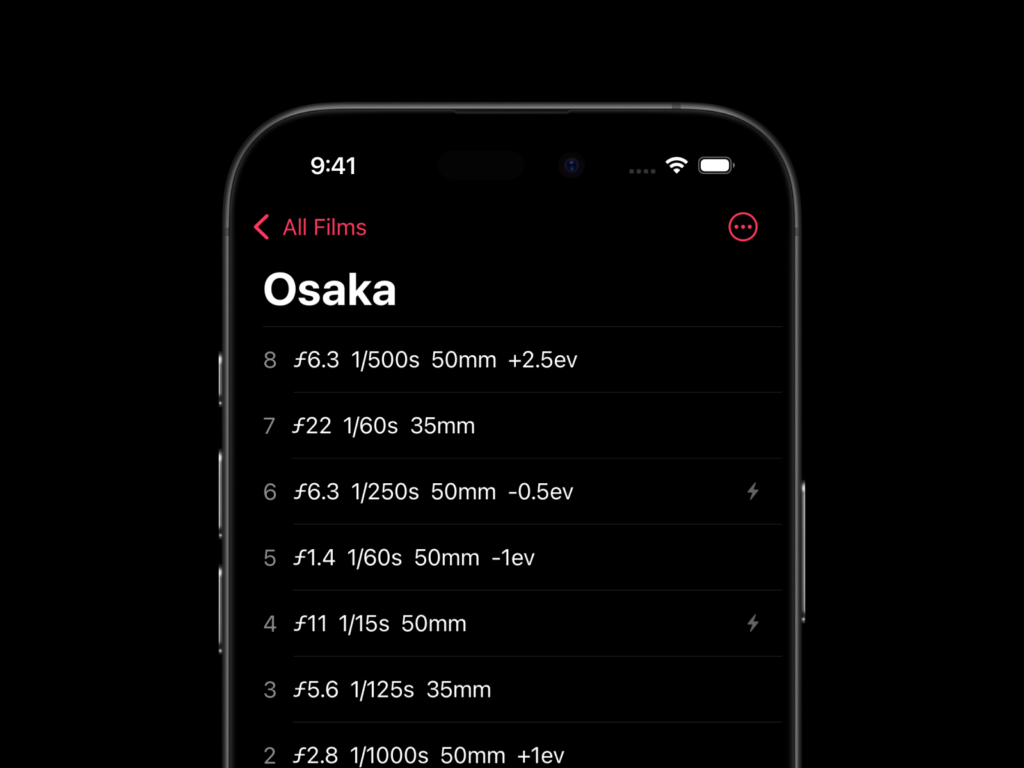
Here’s a concrete example. Last Saturday I was out with Tri-X pushed to 1600, overcast afternoon, around 8°C. I see something — guy on a bench reading the paper, nice rim light coming from a shop window behind him. I meter, I shoot, I tap the screen twice. Aperture, shutter, done. GPS and weather go in on their own. I don’t think about it again until the scans come back.

Three weeks later each frame is sitting next to its data. The one I like — the bench shot with the blacks that almost touch and the highlights that cling to his newspaper — was f/2.8 at 1/60, metered off the shadows. The one two frames over that looks flat and muddy? Same settings, but I’d metered off the window. Seeing those two frames next to each other with the decision I made made visible is where you start to learn properly instead of hoping. That’s how it works for me, anyway. I realise some people enjoy the mystery of not knowing and I won’t tell them they’re wrong.
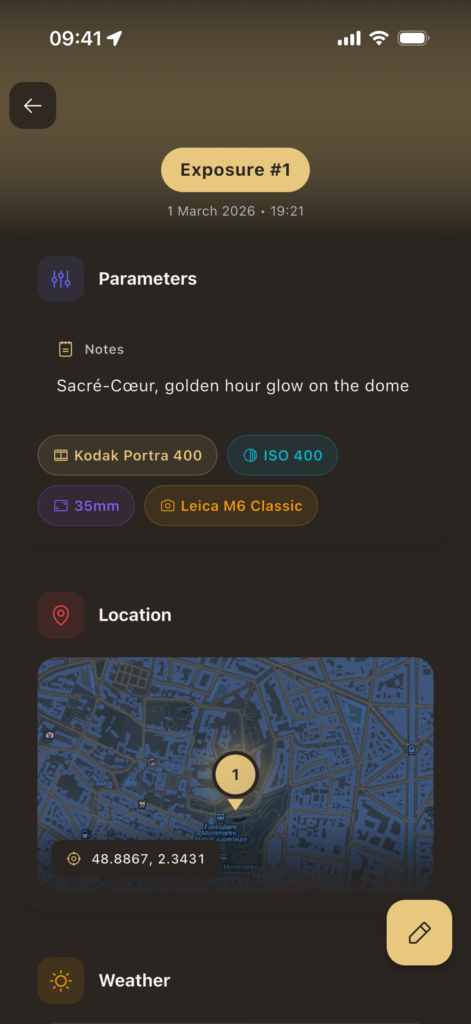
Logging exposure settings in Pellica

The five apps I don’t open any more

Before Pellica my film workflow was scattered across at least five things. A notes app for exposures. A separate light meter. Google Maps searches whenever I needed to find a lab in a new city. A spreadsheet for stock I had in the fridge. And a kitchen timer for home development, which worked about seventy percent of the time and failed in creative ways the rest of the time.

I didn’t set out to replace any of them. I just kept running into the seams between them, and fixing each seam turned into another feature. There’s a built-in light meter now with reciprocity tables for 48 stocks, which I use more than anything else when I’m doing long exposures on Acros. There’s a map of over 500 development labs worldwide with community ratings, which came directly out of a trip to Lisbon where I nearly ruined two rolls trying to find anyone who still processed E-6. And there’s a development timer for C-41, E-6 and black and white, with agitation reminders that have saved me more than once from forgetting an inversion on HP5.
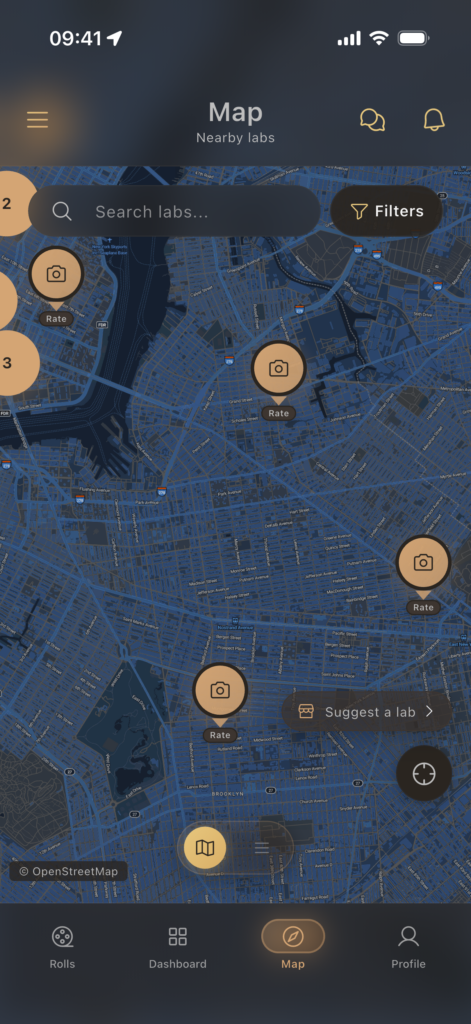
Film development lab map in Pellica with 500+ labs worldwide

None of this was planned. Each piece exists because I hit a problem and thought, I can fix that before the next roll.

What I owe this site

I should be straight about one thing. 35mmc played a direct role in Pellica existing.

This is where I learned to meter for pushed Tri-X. This is where I first read that overexposing Portra by a stop isn’t a mistake, it’s a choice. The way I think about film was shaped in large part by the articles on this site, and that thinking is baked into how the app works.

Pellica doesn’t tell you how to shoot. It doesn’t grade your exposures or recommend settings. It makes it easier to remember what you did so you can draw your own conclusions from it. That’s pretty much the philosophy I picked up reading here over the years — look, try, look again, adjust. Nobody’s going to hand you the answer and honestly the app isn’t trying to either.

One person, working evenings

There’s no company behind Pellica. I’m not raising anything, I don’t have a team, I haven’t written a pitch deck and I don’t plan to. It’s me, between shooting sessions, trying to make the app a little better each week. Some weeks I do a lot. Some weeks I just shoot instead.

It’s free to download on iOS, with a Pro tier that lifts the roll limit for people who shoot more than a handful a month. It works offline, which matters to me because I’ve shot in parts of the Pyrenees where my phone hasn’t seen a signal in hours. Your data stays on your device unless you choose to sync it. There’s support for six languages right now and the Android version is with Google for review as I’m writing this.

If you try it and something feels off — a flow that’s clunky, something missing, an opinion about how film logging should work that I’ve clearly got wrong — I’d like to hear from you. I read every email that comes in. It’s still small enough that I can.

Pellica on the App Store · pellica.app

I am Imad Djebarni and I shoot 35mm in Paris. You can reach me at co*****@*****ca.app.

Share this post:

Find more similar content on 35mmc

Use the tags below to search for more posts on related topics:

Donate to the upkeep, or contribute to 35mmc for an ad-free experience.

There are two ways to contribute to 35mmc and experience it without the adverts:

Paid Subscription – £3.99 per month and you’ll never see an advert again! (Free 3-day trial).

Subscribe here.

Content contributor – become a part of the world’s biggest film and alternative photography community blog. All our Contributors have an ad-free experience for life.

Sign up here.

Make a donation – If you would simply like to support Hamish Gill and 35mmc financially, you can also do so via ko-fi

Donate to 35mmc here.

Comments

Jukka Rrimola on Pellica – Why I Built an App to Track My Film Rolls

Comment posted: 06/05/2026

Heeeyy, Imad! Where are the pictures you took using this app???
Reply

Leave a Reply

Your email address will not be published. Required fields are marked *

Imad Djebarni replied:

Comment posted: 06/05/2026

Hey Jukka :) I hope that you are doing well! The pictures I took are on my IG profile @imsfade

Reply

Leave a Reply

Your email address will not be published. Required fields are marked *

Bradley Newman on Pellica – Why I Built an App to Track My Film Rolls

Comment posted: 06/05/2026

Imad, this looks amazing. I've DL'd it and will give it a shot. (pun intended)
Reply

Leave a Reply

Your email address will not be published. Required fields are marked *

Imad Djebarni replied:

Comment posted: 06/05/2026

Hey Bradley :) Thanks a lot for your support — I really appreciate it! And please don’t hesitate to share any feedback you might have about the app. I’d love to hear your thoughts!

Reply

Leave a Reply

Your email address will not be published. Required fields are marked *

Gary Smith on Pellica – Why I Built an App to Track My Film Rolls

Comment posted: 06/05/2026

Thanks for your work Imad! I have tried being more disciplined in the past using other iPhone apps and to be honest I have never gotten comfortable with any of them. I have multiple film bodies and while it would be great to know what my shutter and aperture were for each shot, I don't even have the patience to keep paper notes. I'll be curious to hear how others make out with your new app, it looks promising.
Reply

Leave a Reply

Your email address will not be published. Required fields are marked *

Imad Djebarni replied:

Comment posted: 06/05/2026

Hey Gary, thanks a lot for your kind words — I really appreciate it! I totally get what you mean, and I built Pellica to make film roll tracking feel simple, not like another chore.

Reply

Leave a Reply

Your email address will not be published. Required fields are marked *

Alastair Bell on Pellica – Why I Built an App to Track My Film Rolls

Comment posted: 06/05/2026

Any chance of an Android version?
Reply

Leave a Reply

Your email address will not be published. Required fields are marked *

Imad Djebarni replied:

Comment posted: 06/05/2026

Hi :) It's already available on android: https://play.google.com/store/apps/details?id=com.imad.rollify

Reply

Leave a Reply

Your email address will not be published. Required fields are marked *

Eric Rose on Pellica – Why I Built an App to Track My Film Rolls

Comment posted: 06/05/2026

So glad you are releasing an Android version!! Let us know when the Android gods have finally blessed your creation.

Eric
Reply

Leave a Reply

Your email address will not be published. Required fields are marked *

Imad Djebarni replied:

Comment posted: 06/05/2026

Hi :) It's already available on android: https://play.google.com/store/apps/details?id=com.imad.rollify

Reply

Leave a Reply

Your email address will not be published. Required fields are marked *

CHRISTOF RAMPITSCH on Pellica – Why I Built an App to Track My Film Rolls

Comment posted: 06/05/2026

Pellica is on my phone now (Pixel 7). I usually shoot LF or MF. For LF, I have time to take detailed notes and I use my phone to photograph the lens so that I get the settings, and the scene I am shooting, which gives me the location too. But for MF... yeah, usually no notes taken at all. I've tried everything that you tried, notes, apps, memory ("I'll definitely remember this f/stop!"). Usually the settings aren't so important, but there are times when a learning opportunity is missed for sure. I'm looking forward to it! Where would you like feedback?
Reply

Leave a Reply

Your email address will not be published. Required fields are marked *

Imad Djebarni replied:

Comment posted: 06/05/2026

Hey Bradley, thanks so much for installing Pellica — I really appreciate it! I’m glad you’re looking forward to trying it. Feel free to send any feedback, thoughts, or suggestions to [email protected]. I’d genuinely love to hear what you think once you’ve had a chance to use the app.

Reply

Leave a Reply

Your email address will not be published. Required fields are marked *

Khürt Williams on Pellica – Why I Built an App to Track My Film Rolls

Comment posted: 08/05/2026

Imad, this was a really interesting read. I can tell Pellica came from actually living with the frustrations of shooting film rather than just trying to build “yet another app”. I’m a Crown + Flint user myself, so a lot of what you described felt very familiar.

I think that these apps seem much better at solving organisation problems than capture-friction problems. They make perfect sense to me for slower, deliberate photography; tripod landscapes, medium format work, testing film stocks, that sort of thing.

Where it starts to fall apart for me is street photography, travel, or any situation where the light and moment are changing quickly. The second I’m really immersed in making photographs, the logging workflow starts to disappear. I either stop recording frame-level data altogether or I miss shots because I’m fiddling with my phone instead of paying attention to what’s happening in front of me.

Over time I realised the interruption itself was a problem.

That’s not a criticism of Pellica specifically; honestly, I think it’s the unsolved problem for this whole category of apps. In a way I was trying to recreate a digital metadata workflow around cameras that were never designed to expose that information automatically.

Still, I really respect what you’re doing here.
Reply

Leave a Reply

Your email address will not be published. Required fields are marked *

Imad Djebarni replied:

Comment posted: 08/05/2026

Hey, Yeah this is the thing right? You basically nailed the wall I keep hitting too, and I've been bouncing between my own attempts and other apps for like a year and a half. The deliberate stuff works. Testing a new stock, tripod days, a project where I actually want to know what I did. Logging is gold there. But last summer I did 4 rolls in two weeks in Mallorca and I logged maybe 8 frames total. The rest I just shot. Every time I tried to log I missed something better happening behind me. Came home, frames are good, no idea what's what. So yeah, I get it. Two things on my mind, neither shipped yet: A quick-start mode — tap once, roll is in progress, gear/location/weather snapshot, done. Then the app shuts up until you're home. Per-frame becomes optional, not the default. You log if you feel like it. You don't if you're in it. And voice. Long press the lock screen, mumble "f8 sixtieth, that woman with the umbrella near Republique" and let it sit there attached to the current frame. Whisper notes basically. Way less friction than unlock-open-find-roll-tap. Even those don't fully solve what you're pointing at. Sometimes the camera is your eye and anything else is intrusion. Probably no phone tool fully fixes that. Best I can do is shrink the moments where it does interrupt. Anyway. Crown + Flint is good too. Different angle on the same problem, room for both. If you ever shoot a roll and find yourself thinking "this would've worked if X" — write me. Best stuff in the app came from people doing exactly that. Cheers, Imad

Reply

Leave a Reply

Your email address will not be published. Required fields are marked *

Louis Sousa on Pellica – Why I Built an App to Track My Film Rolls

Comment posted: 08/05/2026

Hi, I downloaded the app. Nice setup. Does the meter allow for use of spot metering or does it gather light from the entire scene?
Reply

Leave a Reply

Your email address will not be published. Required fields are marked *

Imad Djebarni replied:

Comment posted: 08/05/2026

Yes — spot metering is built in. The meter has four modes you can switch between, accessible from a horizontal row of chips at the top of the Lightmeter screen: • Matrix — full-scene grid pattern • Center-Weighted — emphasis on the center ~60% (default) • Spot — small spot, ~3-5% of the frame, at the center • Highlight — biases toward protecting the brightest areas, useful for slide film like Velvia or Provia To use it: open the Lightmeter, tap "Spot" (the crosshair icon) in the mode row at the top, and a dashed circle appears on the camera preview. Point it at whatever you want to meter for — a face, a midtone, a shadow zone — and the EV reading updates in real time as you move the phone. The spot size is also configurable in the meter settings if you want it tighter or wider than the default. Glad you're putting the app through its paces — if anything else feels missing from your workflow, just hit reply. I read every email :)

Reply

Leave a Reply

Your email address will not be published. Required fields are marked *

Ulrich Brinkmann on Pellica – Why I Built an App to Track My Film Rolls

Comment posted: 14/05/2026

Hi Imad, thanks for sharing.
For my analogue endeavors I returned to paper trailing after, about 10 years ago, I had started to use an ios app (PhotoExif) which had a companion macos app to export the roll data to and promised to add the data to the scanned images' exif data in a directory. I think I successfully went through the process end-to-end once. It was a hassle because you had to be careful with naming the scans. And after all, the macos app stopped being compatible with updated operating systems, so the export function turned meaningless. So I returned to my system of paper forms printed out in A6 and rubber-bound in a leather cover, one form for large format (1 sheet for 1 sheet), one form for medium format (1 sheet for 12 images and one form for 135 film (1 sheet for 38 images). After developing, I cut the sheets from their double spread and tape them to the contact print, once those are ready. Makes me make contact prints again.
So far so good. Now your description of your app comes along and sets me thinking again. Thank you for that.
So I was surprised that you included light metering, which is probably what you do as a programmer's prerogative. I use the iphone for metering with two apps, the viewfinder app which I need for LF and a lightmeter app, for when I am on the street with a Rolleiflex which doesn't have a light meter. And for the darkroom stuff there is the massive dev app, which completely covers my needs.

So when I think about an app replacing the note taking, there's two critical points I see.
One is, of course, using the app in the process of taking pictures, which I about the same disruptive force that an analog notebook is. – Btw, I found that with the notebook, in scenes which require attention and more shots, the exposure mostly stays the same, so I can retroactively fill out the form for a couple of images from memory after the scene, nothing much changed during the action itself. The exact minute of the exposure time stamp rarely matters. So that would have to be kept in mind for the on-the-scene usage of the app.
The second critical point concerns the association of app record data and the digital twin of the image (the scan). Do I understand correctly that your way is to import the scan into your app? If so, that would not be my preferred way. I'd rather have the data in the image's exif layer and the proceed to the usual postprocessing (lightroom, darktable, what have you). So that's a requirement for me.

Anyway, your report gave me some ideas. Maybe I'm going to roll my own with the help of Claude when I see more clearly how to address the critical points (have a background in software development myself).

Best regards from across the Rhine river
Reply

Leave a Reply

Your email address will not be published. Required fields are marked *

Imad Djebarni replied:

Comment posted: 14/05/2026

Hi Ulrich, thanks for the detailed read — your PhotoExif story is exactly the kind of trauma that pushes people back to paper, and I take that seriously. Quick replies on your two points: on EXIF, Pellica's export writes the shot metadata to your scan files so the data ends up in your usual Lightroom/Darktable pipeline rather than locked inside a closed app — that was a non-negotiable for me too; on in-the-field friction, there's a Quick Shot button that logs a frame in a single tap, but you're right that for a static scene with several same-exposure frames even one tap per frame won't beat your A6 batch-fill, and I won't pretend otherwise — Pellica beats a notebook for ad-hoc shooting, but loses to your system on that specific case. The light meter is bundled because most users don't already have a dedicated app and one less tool to install matters, but it's entirely optional — if Massive Dev + your viewfinder + your meter cover you, ignore it. If you do end up coding your own I genuinely wish you well, but if you're curious give Pellica a quick try first — a bug report from someone with a working paper system would be worth far more than any marketing copy I could write. Grüße from Paris :)

Reply

Leave a Reply

Your email address will not be published. Required fields are marked *

Leave a Comment

Leave a Reply

Your email address will not be published. Required fields are marked *